
4. Describe images
Suggested approach
Here's an essential step you can take when adding images to your site that makes your site more accessible and great for Search Engine Optimization (SEO): use the <alt> code attribute for your images.
When you add an image to your site, you can expect the image code to look like this:
<img src="https://domain.com/imagename.filetype">
This piece of code will display the image noted in the src or "source" tag. Adding an alt or alternative text tag to the image will also include a description that can be read-allowed by a screen reader or viewed in any other way to supplement the image.
<img alt="A description explaining the context of this image." src="https://domain.com/imagename.filetype">
Images that provide added context to content must include an alt tag.
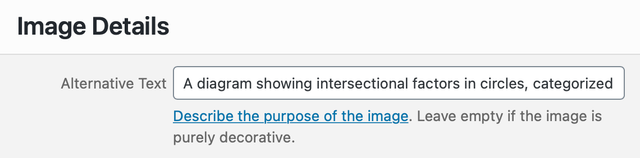
An example view of how a content management system (CMS) may support an alt tag when adding or updating an image.
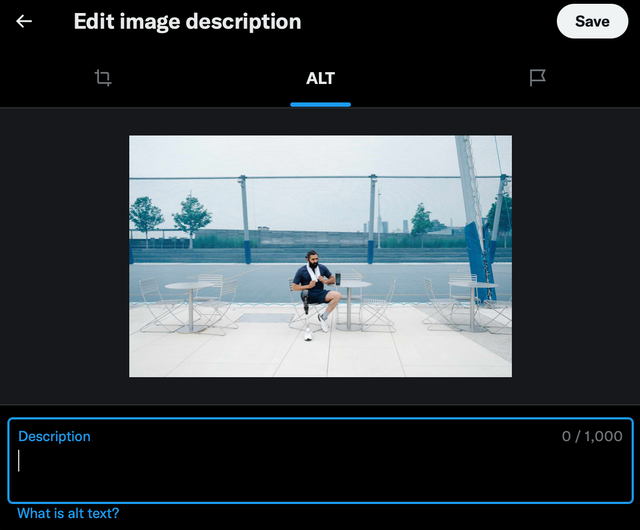
An example view of how a content management system (CMS) may support an alt tag when adding or updating an image.
Alt tag best practices
- Decorative images shouldn't have tags, as these tags will distract from the content.
- There is no need to repeat something already in text form as this will just be read twice by a screen reader.
- Don't call an image an image. The system will describe an image as such, so you don't want to end up with: "Image: An image of..." for example.
- Describe what you want the image's takeaway. It doesn't have to be literal and shouldn't be too wordy. Most importantly, describe what the image conveys within the context of the content. If the image doesn't add to what you're trying to communicate in the content, the image is decorative and should not have an alt tag.
- If there's an essential text as part of the image, it should be written out. For example, a chart or infographic with data points and other information that informs the context of the content should include those data points and detail in the alt tag.
Focus on describing what someone would see rather than what you or they may infer
For example, if a photo of someone in a wheelchair applies to the context of the content, it's imperative to include it in the alt tag if not clarified in the content.
Similarly, if someone is Black but not described in the content, it's also essential to include this description in the alt tag, even if that is a critical part of understanding the context.
Avoid implying abstract concepts (i.e., culture, beliefs, etc.) that a sighted person cannot grasp from looking at the image. They should have the same context, not less, than anyone reading the alt tag.
Suggested approach
Include descriptions that contextualize the image to the alt tag.
People interpret abstract concepts like faith and culture differently. Moreover, elements of an image can hardly convey their meaning.
Avoid suggesting meaning to things that sighted people cannot understand from an image.
This rule also applies to any inference, assumption, or other consideration not shown in the image. If it is essential to describe such things, this should be in the text, not limited to the alt tag.
Additional SEO benefits
Search engines read alt tags as well as image names. Including vital information or descriptive detail such as a person’s name in their photo and image title will help rank the image and page content based on that applicable term.
Suggested approach
Avoid using image names such as “screenshot”, “image 001”, and “IMG_0676”. These image names don’t help with searching or search engine optimization (SEO).
Name your images based on the content of the image.
Suggested resource
Accessible Publishing’s Guide to Image Descriptions goes into further detail on image descriptions and alt tags, with the following sections: